How Storage Systems Prevent Data Loss
Contents
Introduction
“In 2011, an AWS outage knocked Reddit, Quora, and parts of Netflix offline. The root cause? A single typo that triggered cascading replication failures. This post unpacks how modern storage systems are engineered to prevent such data loss, from your laptop’s file system to Google’s global-scale architecture.”
The core of enterprise storage systems is to provide customers with reliable, highly available, and high-performance data services. Different customers have different needs; for example, banks are more concerned with reliability and availability, while AI companies focus more on ultra-high performance. Data reliability is a core requirement of storage systems—no one wants to wake up the next morning to find a zero missing from their bank account. Storing data reliably might seem like a given, but in practice, many unexpected issues can arise.
There are three main mechanisms to ensure storage system reliability:
- Software-level safeguards
- Single-node: FSCK, journaling, and snapshotting for crash consistency and recovery.
- Distributed systems: Replication (multiple copies) and erasure coding for fault tolerance across nodes.
- Single-node hardware-level safeguards
- RAID (e.g., RAID 1/5/6) to protect against local disk failures using mirroring or parity.
- Infrastructure-level safeguards
- Cross-site replication, geo-redundancy, and multi-region architectures to withstand data center or regional outages.
A bit more context
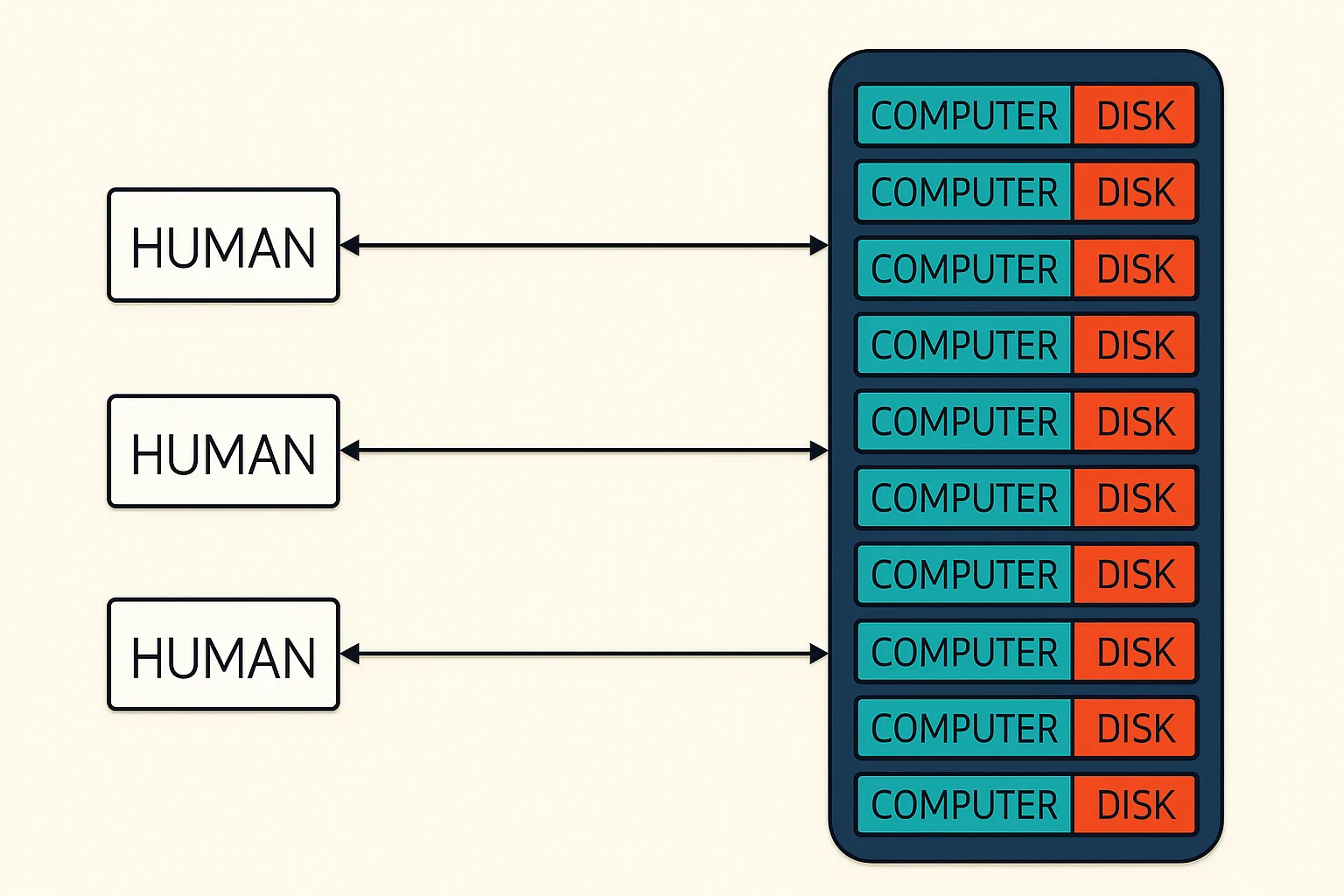
What is storage and how has it evolved? When we talk about cloud computing and its services (e.g., AI), we’re really talking about three fundamental components: Compute, Network, and Storage. Humans first wrote on rock, then progressed to paper and ink. Only recently did we discover how to write information to computers, which initially stored data on magnetic tape. As we entered the era of mobile computing, the volume of data exploded, and the number of users accessing central computers (servers) increased dramatically, making these systems increasingly busy. The computers grew larger and more expensive until they reached their limits.
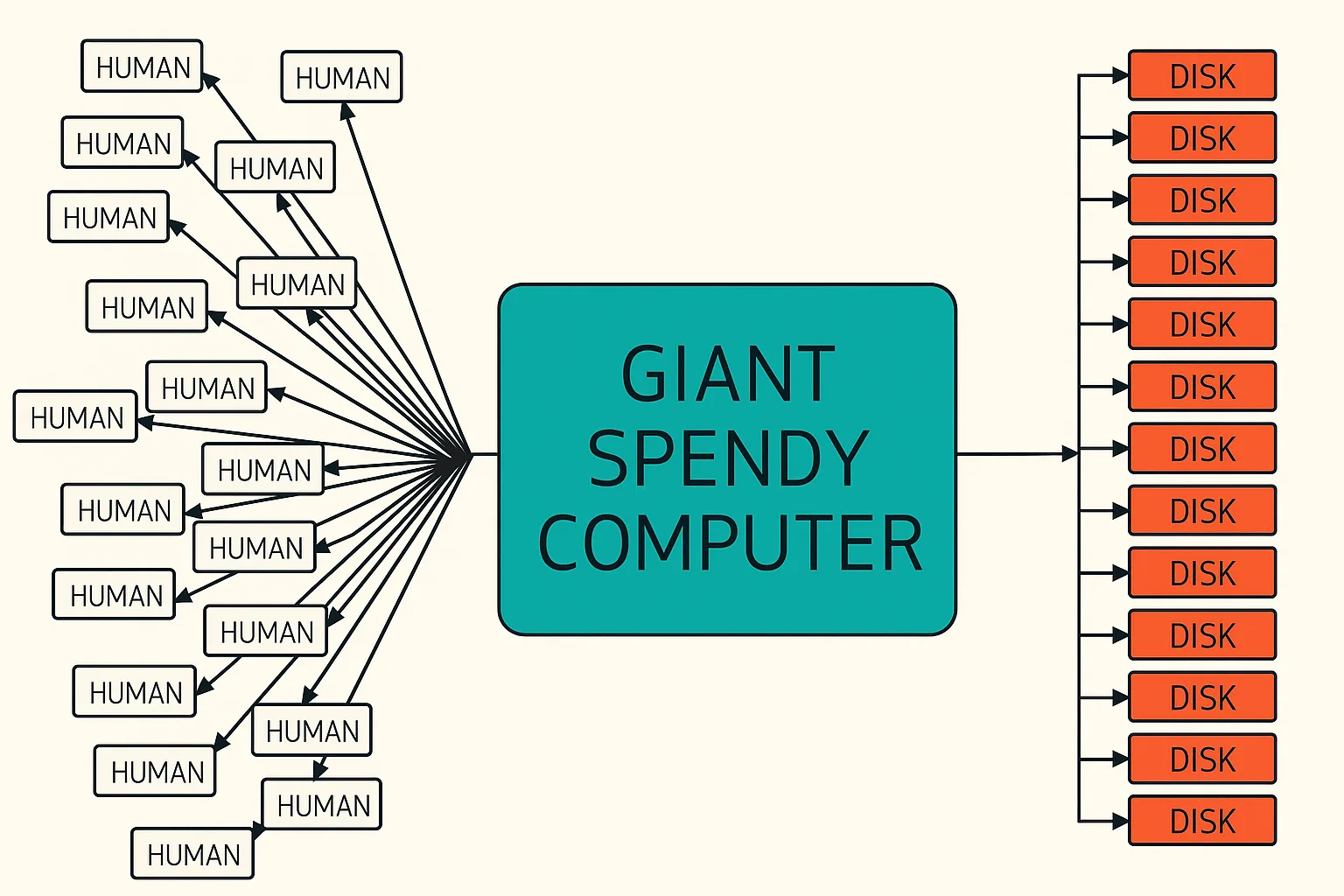
The solution was to create clusters of computers with their disks, managed by proprietary software and packaged into storage appliances for enterprise customers. Companies like Dell EMC and NetApp sell these sophisticated systems, essentially a large black box containing multiple computers and disks, with proprietary hardware (like NetApp disks) and specialized software (such as ONTAP storage OS and WAFL file system). These systems come with support and maintenance services and are installed in customers’ data centers. While expensive, they provide the speed, reliability, and high availability required for enterprise workloads.
The Core of Storage System Reliability: Software
Let’s first discuss storage systems and what reliability means. Reliability implies that data is safely stored on hardware, specifically on disks like HDDs or SSDs. In simple terms, disks are just collections of 1s and 0s, representing your bank balance, videos, music, and so on in binary form. These disks are highly precise instruments, so they can fail. If you have a large number of disks, like in Google’s data centers, disk failures might become a daily occurrence. Now that you have a bunch of disks, how do you store data in them? You certainly wouldn’t manually transfer data to each disk one by one, so you need a system to handle this for you, providing the abstraction of a “storage pool.” This introduces the concept of Software Defined Storage, which uses software to abstract hardware to achieve precise and efficient control. People encountered this problem twenty years ago, leading to the inception of many file systems, such as NetApp’s WAFL (Write Anywhere File Layout) and Linux’s Ext file systems.
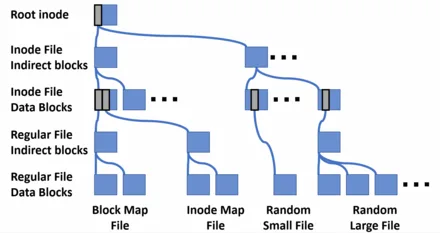
File systems abstract 0s and 1s into files and metafiles expressed with inodes, while also recording which blocks have been used and which haven’t, along with a lot of other information. Now imagine you’ve written a file system that perfectly records all this information, just like writing a complete application—the functionality is comprehensive. But you’ll find that you might encounter power outages, hardware failures, and so on. Indeed, kernel code cannot make any assumptions; power outages can happen at any time, hardware might go offline due to human error, and bits in the hard disk or DRAM might flip. So now we have a new problem: how do we ensure that even in the case of sudden power outages and unreliable hardware, the file system’s data remains correct and reliable? This issue is known as the file system crash-consistency problem.
First, let’s define what consistency means. Consistency implies that all internal data structures of the file system are correct and coherent. For example, if the data bitmap that records whether a block is occupied shows that this block is used, then this information should be accurate; otherwise, it’s inconsistent, or what we call file system corruption. The file system continuously checks whether it maintains consistency, and if it detects inconsistency, it will panic and stop the program, awaiting engineer investigation. Of course, this is the last resort; file systems are designed with many considerations on how to avoid inconsistency and, even if inconsistency occurs, how to quickly return to a consistent state.
Now, suppose our file system becomes inconsistent due to a sudden power outage. We just wrote the metadata file but haven’t written the data file yet, so the metadata and the actual data file are inconsistent. What should we do now? This is another challenge in storage systems. This problem has led many engineers to think deeply, and generally, there are two solutions: FSCK and Journaling.
First, FSCK stands for File System Consistency Check, meaning that the FSCK program checks the state of the file system. Since the structure of the file system is a tree of blocks, FSCK starts from the top superblock and checks layer by layer, repairing the corrupted file system—much like a giant scanner that scans the entire file system from start to finish. This process can take a long time, and the larger the file system, the longer it takes, and it doesn’t guarantee a complete repair. So generally, when people hear that FSCK is needed, it’s basically time for a coffee break.
Journaling means that before actually writing data, you first write down “I’m going to write this data to that place,” like taking a note. In this way, the system first writes the journal and then writes the actual data, ensuring that even if a power outage occurs during the second step of data writing, you can still recover after rebooting based on the journal. If the journal is incomplete, you can simply discard the incomplete part and preserve the consistent portion. Journals are usually written first to persistent storage media, such as non-volatile memory or on-disk storage.
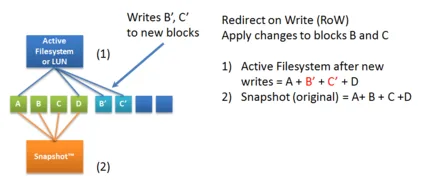
NetApp’s WAFL File System was initially popular among users because it solved the problem of FSCK taking too long. Since the WAFL file system always writes data to new locations (Redirect-on-write), meaning it doesn’t overwrite data, the file system continually saves and advances to the next consistency state. WAFL calls this a consistency point. So when WAFL crashes, it doesn’t need a lengthy FSCK; it just needs to roll back to the previous consistency point. Then, it replays the journal stored in NVLOG to restore the file system to its state before the crash. Consistency points are generated continuously over time, and previous consistency points are not wasted but exist as a “frozen moment” or snapshot. This way, if a customer wants to revert to a previous state after accidentally deleting data—say, a week or a month ago—the file system can accommodate that.
Drilling Down: Reliability of Individual Hardware
“While software guards against logical inconsistencies, we must now descend a layer and confront the physical fragility of the hardware itself.”
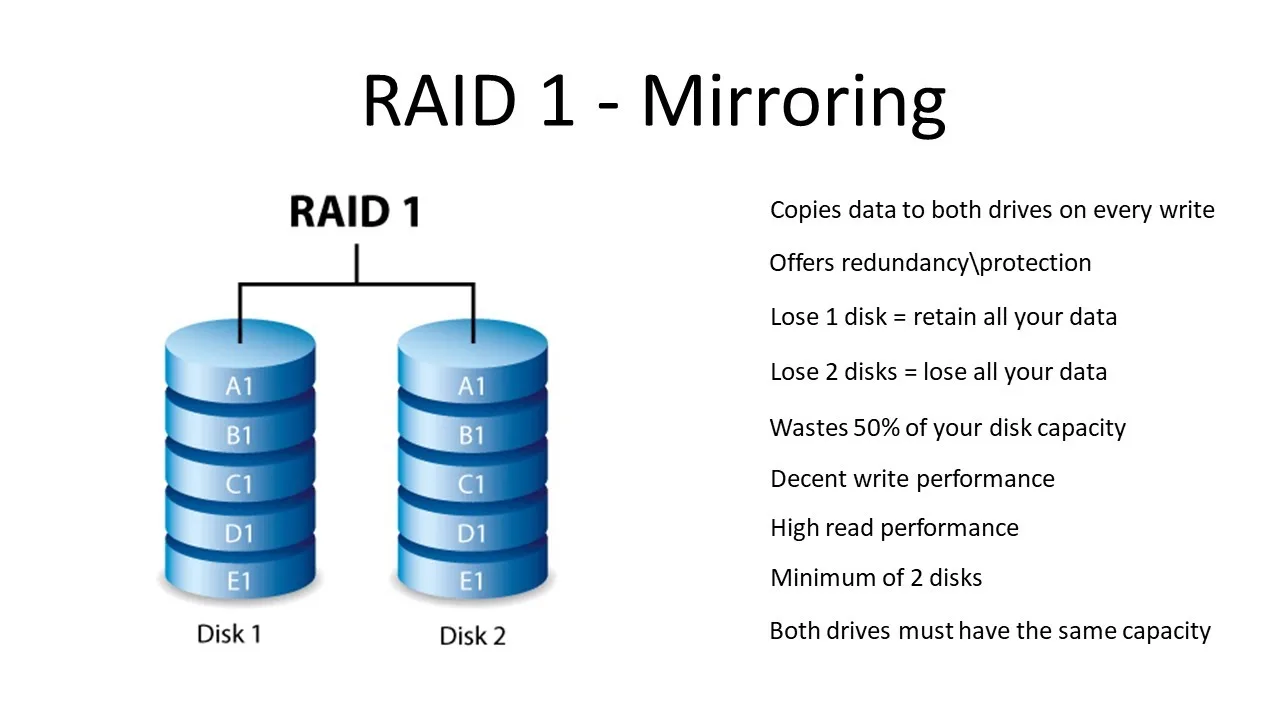
Each file system corresponds to a standalone computer that manages the storage space it owns. This storage space consists of multiple disks. However, each disk is fragile; if it fails, the data is lost forever. But disks have an advantage: they are cheap. So people came up with RAID (Redundant Array of Inexpensive Disks), combining disks into an array to form a highly reliable unit for storing data. RAID is a general term for various disk combinations and corresponding algorithms. For example, the simplest RAID-1 simply duplicates all writes to a pair of disks. This is obviously more reliable, but disk utilization drops to 50%.
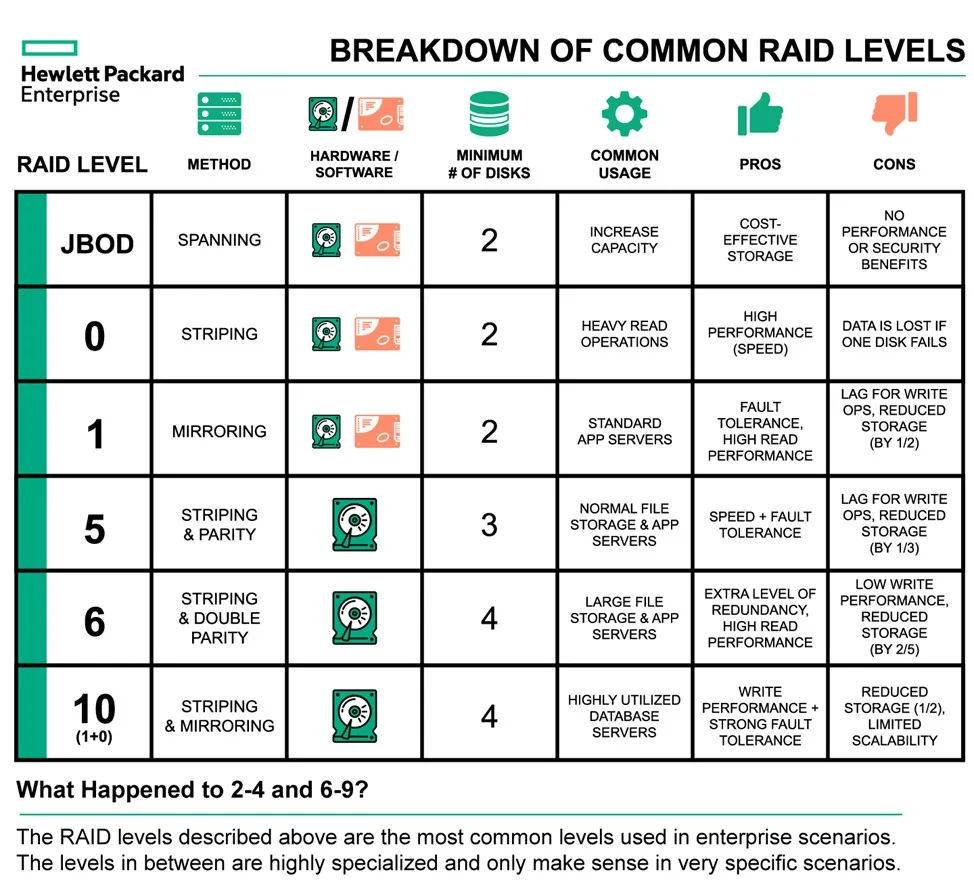
So how can we achieve data reliability without significantly reducing disk utilization? Addressing this problem, engineers invented RAID-5, which employs Striping & Parity RAID. RAID-5 primarily tackles the issue of single disk failure. By designating one disk as the Parity Disk, storing the XOR values of all other disks, RAID can recover data from a failed disk. Building on this idea, engineers also developed RAID-6, which uses two Parity Disks to compute both horizontal and vertical parity values, tolerating the failure of two disks. The diagram below provides an overview of all current RAID types; each type has its pros and cons, involving trade-offs. A fun fact is that no RAID configuration can outperform RAID-0 in terms of performance, but RAID-0 is also the most prone to data loss. In general, RAID solves the problem of unreliable individual disks in a cost-effective way and is the cornerstone of every file system. The file system relies on the blocks layer abstraction provided by RAID and, of course, the reliability of the RAID abstraction layer.
Horizontal Scaling: Distributed Storage Systems
While a reliable file system forms the foundation of single-server reliability, individual machines face inherent constraints, including limited computing power, storage capacity, and the risk of hardware failure. Over time, the data accumulated by enterprises grows exponentially, which in turn drives higher demands on storage systems and led to distributed storage systems.
Distributed storage systems can be roughly divided into two categories: Traditional Distributed File System focuses on general-purpose storage and Large-scale distributed storage tuned for data processing factory.
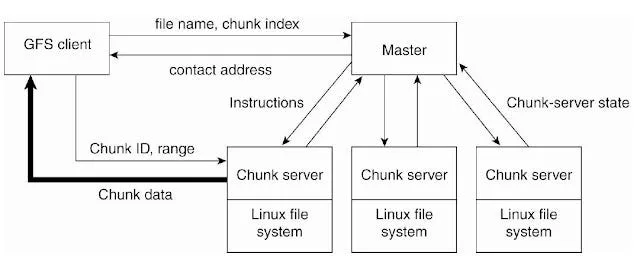
The emergence of these two forms depends on specific business needs. Large-scale distributed storage includes a vast number of nodes, each being relatively cheap commodity hardware. Representative systems are GFS (Google File System) and its open-source counterpart HDFS (Hadoop Distributed File System). Such systems have excellent scalability and are well-suited for big data analytics businesses, such as steaming data processing in advertising. But with advantages come disadvantages; multiple nodes and redundant copies introduce challenges to data security and privacy, and it’s difficult to meet workloads that require strong consistency and low latency. Similar systems include Amazon’s S3 family. However, unlike Google’s needs, Amazon needs to store a large amount of unstructured data, which led to the concept of buckets. There’s a lot more to discuss the trade-offs between each system.
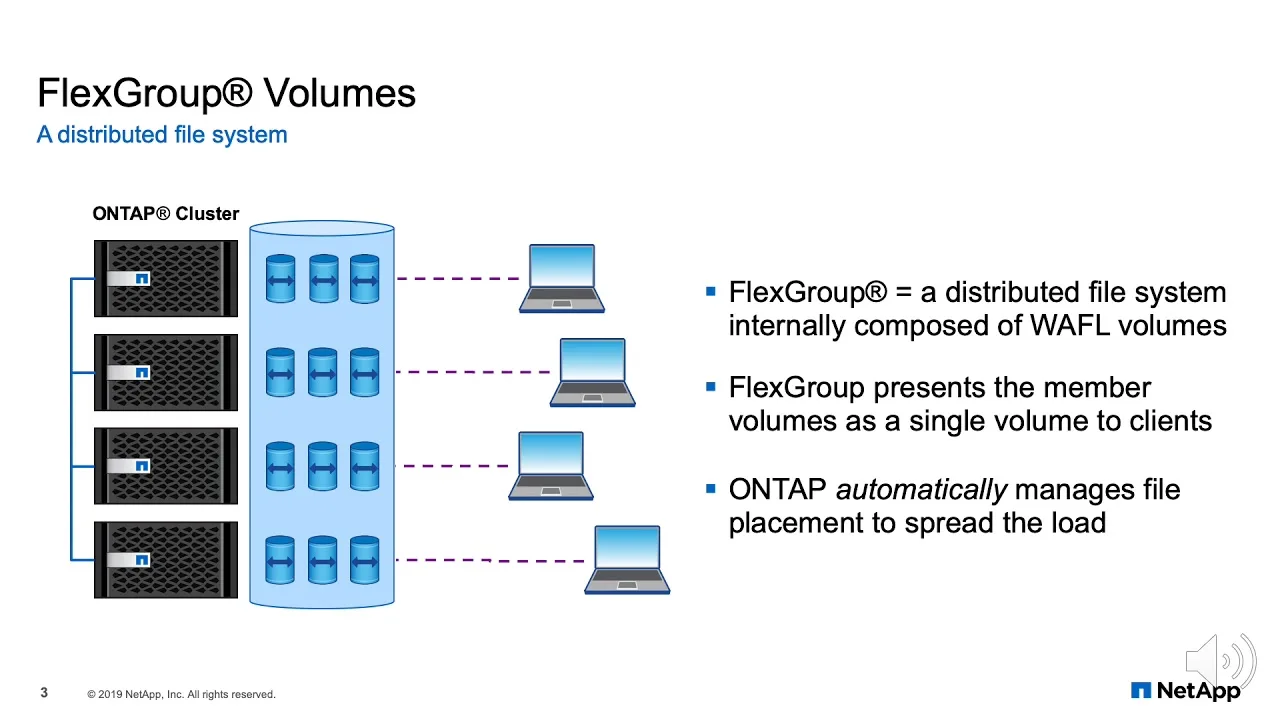
Another type is “Traditional” Distributed File System, which seems to have evolved from the single-machine era. This type of distributed storage prioritizes strong POSIX compliance, small file performance, and consistency, functioning like a single-node file system while abstracting away its distributed nature.
For example, NetApp offers FlexGroup, which aggregates multiple FlexVols (called constituents) into a single logical namespace. These constituents are distributed across multiple nodes and aggregates, enabling parallelism, load balancing, and scalability. Similar distributed file systems include GlusterFS and CephFS.
Although distributed storage seems fascinating, I would like to emphasize one point: Distribute only when necessary. The complexity of distributed storage systems naturally introduces many issues, making it difficult to trace the root cause of problems. Moreover, today’s single nodes are much more powerful than the mainframes of the previous generation and can handle various scenarios’ demands. Cost is also an issue; the maintenance and price costs of distributed systems may be higher. Technical choices always involve trade-offs, and since technology is constantly evolving, these trade-offs need to keep pace with the times.
After briefly discussing the categories and distinctions of distributed storage systems, let’s talk about reliability at the distributed level. The core of reliability at the distributed level boils down to two words: replication. For example, geo-distributed replication refers to replicating data to data centers in multiple geographical locations to prevent data loss due to catastrophic events in a single location. Or replicating on-premise data to the slower but cheaper tier cloud storage. For example, NetApp provides Composite Volume, which is the hybrid use of SSD and Cloud Volume to achieve the most economical and practical reliability.
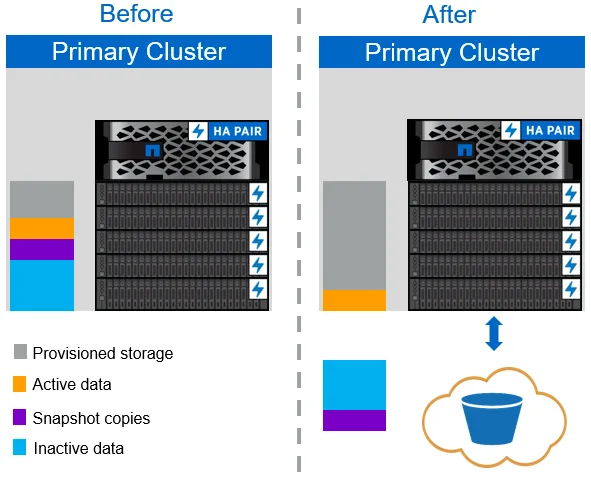
Moreover, replication methods are generally divided into two types: asynchronous replication and synchronous replication. Asynchronous replication means to asynchronously copying data to remote locations, suitable for disaster recovery scenarios but may result in brief data inconsistencies. Whereas synchronous replication means writing data to multiple locations simultaneously, e.g. NetApp sync SnapMirror, ensuring immediate consistency but potentially affecting performance due to latency. Therefore, there are various methods and architectures for reliability, and different enterprises will combine them in different ways to meet their specific needs.