UNIX Security Introduction
Contents
UNIX Introduction
Operating Systems and Security
OS security typically consists of the following four items
- Login and user accounts
- Info about users are stored in accounts
- This includes privileges granted to a user
- Identification and anthentication identify a user
- Access control
- Permissions on resources can be set by the admin
- Permissions will depend on the user’s identity
- Audits
- Security involves prevention and detection
- Mechanisms are needed to determine security violations
- Configuration management
- Updating OS based on security needs
UNIX Background
UNIX is originall intended for one computer with multiple users
- So that user mistakes can be isolated
- Initial UNIX design didn’t have security in mind, the trust association is: If you connect to mainframe, then I must trust you
UNIX System & Security
UNIX Mechanisms
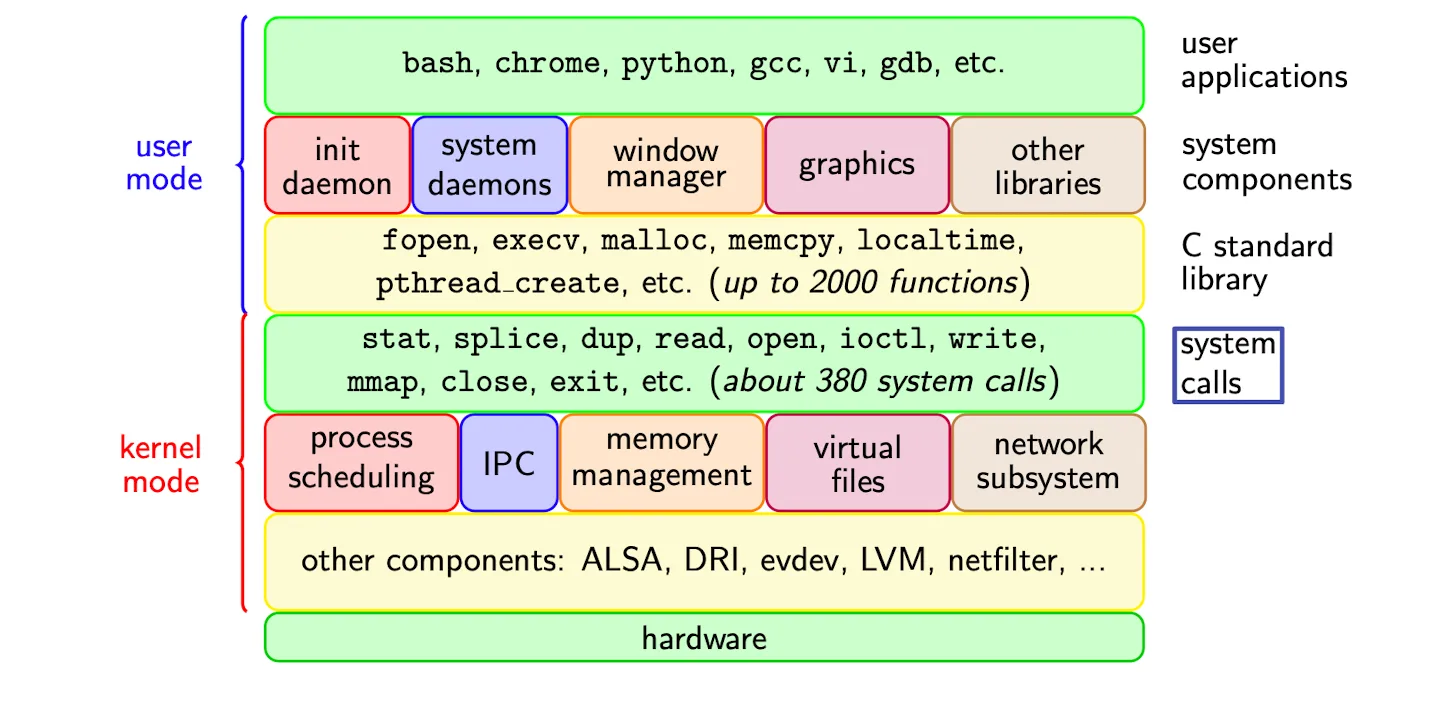
- UNIX program runs as either
kerneloruser, which correspond to complete or limited control of all resources
Runlevel
-
There are Seven runlevels
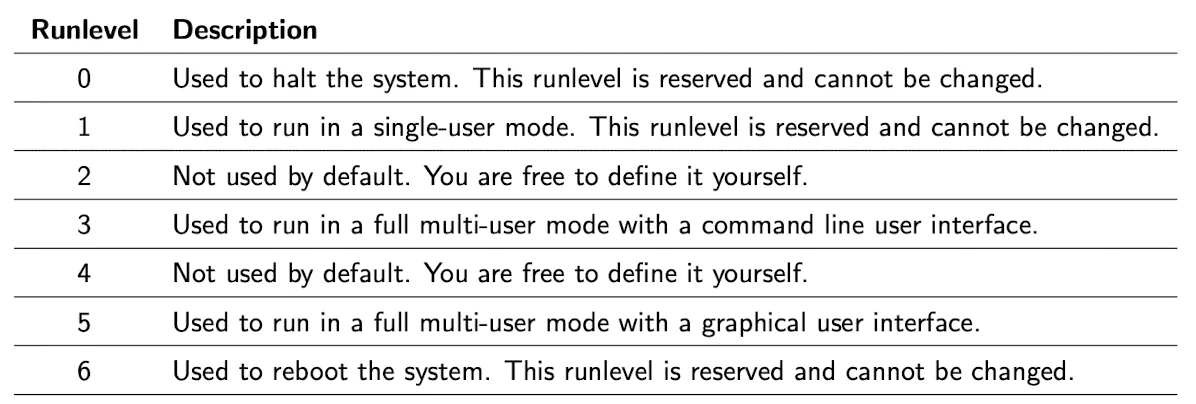
For example, our AWS VM has a run level equals 5, so we have graphical user interface. To check runlevel, use
runlevelin CLI.
System’s runlevel gives you an idea of the computer, e.g. whether it’s a single user computer, a server, etc.
-
Consider UNIX system booting
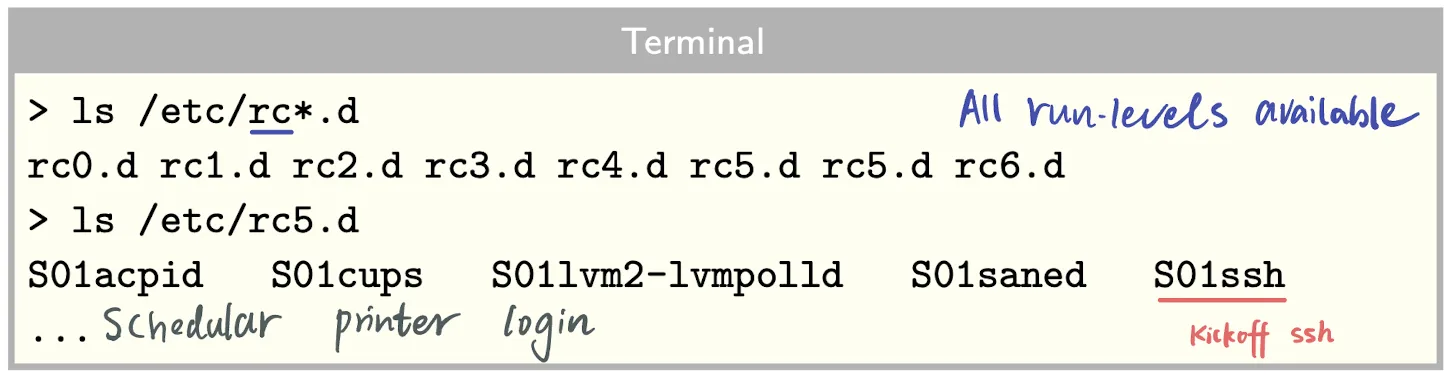
initprocess starts → kick off everythinginitdetermines the default runlevel (set by admin)initruns the scripts associated with the runlevel, which are located in/etcdirectory with one directory per runlevel
Login and User Accounts
Password
-
In UNIX, users are identified by user names
- Authenticated by passwords
- Passwords are encrypted and stored in
/etc/passwd
-
In
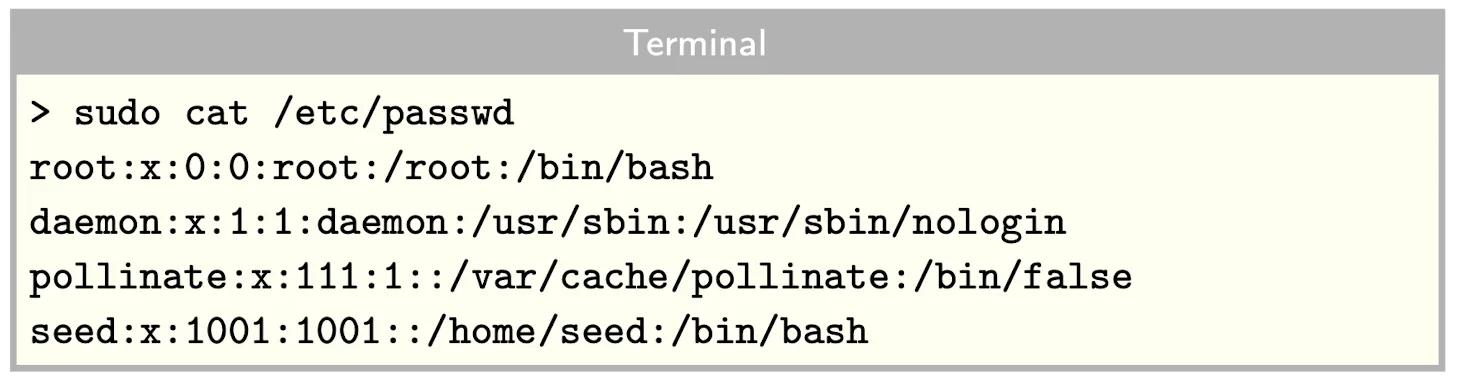
/etc/passwd, every user’s row looks like:

The root user always has UID = 0, which provides the highest level of permissions in Unix
- If the password is empty, password is not required
- If the password starts with an
*, the user cannot login
-
/etc/passwdis readable by any user (in the good old days), but only root can write to this file- Security risk: user can elevate privileges by setuid and modify readonly files
-
/etc/passwdand Shell-
Shell is the command line environment given to the account
-
If the shell is
/usr/sbin/nologinor/bin/falsethen Cannot login
Why have an account you cannot log into?
Every process has to run by an owner, so admin may want to create a user to run certain processes. So that admin can kill these processes by kill corresponding user.
- Security: In some cases, a process or service may require access to certain system resources, such as files or network ports, but does not need a user shell or interactive login. By creating a dedicated system account for the process or service, system administrators can restrict access to the necessary resources while minimizing the risk of unauthorized access.
- Process isolation: Sometimes, it is necessary to create a user account to run a particular process, but it is not desirable to allow the user to log in interactively or run other programs. For example, a web server may need a dedicated user account to run its processes, but that user should not have shell access or be able to run other programs on the system.
- Backup purposes: Creating system accounts for backup purposes, such as for system-level backups, allows for a clean and organized environment. It also helps to ensure that no user or program can interfere with the backup process.
-
-
Shadow Files
-
There is a security risk with a readable password, so people create shadow files to store hashed password now
-
If a shadow password file is used
-
An x is placed for the password in
/etc/passwd
-
The actual encrypted password is located in
/etc/shadowand this file is readable only by root
-
-
To crack the password, you need to creack these two files and merge. You also can use John the Ripper (JTR) to do the cracking automatically.
-
-
Interpret
/etc/shadow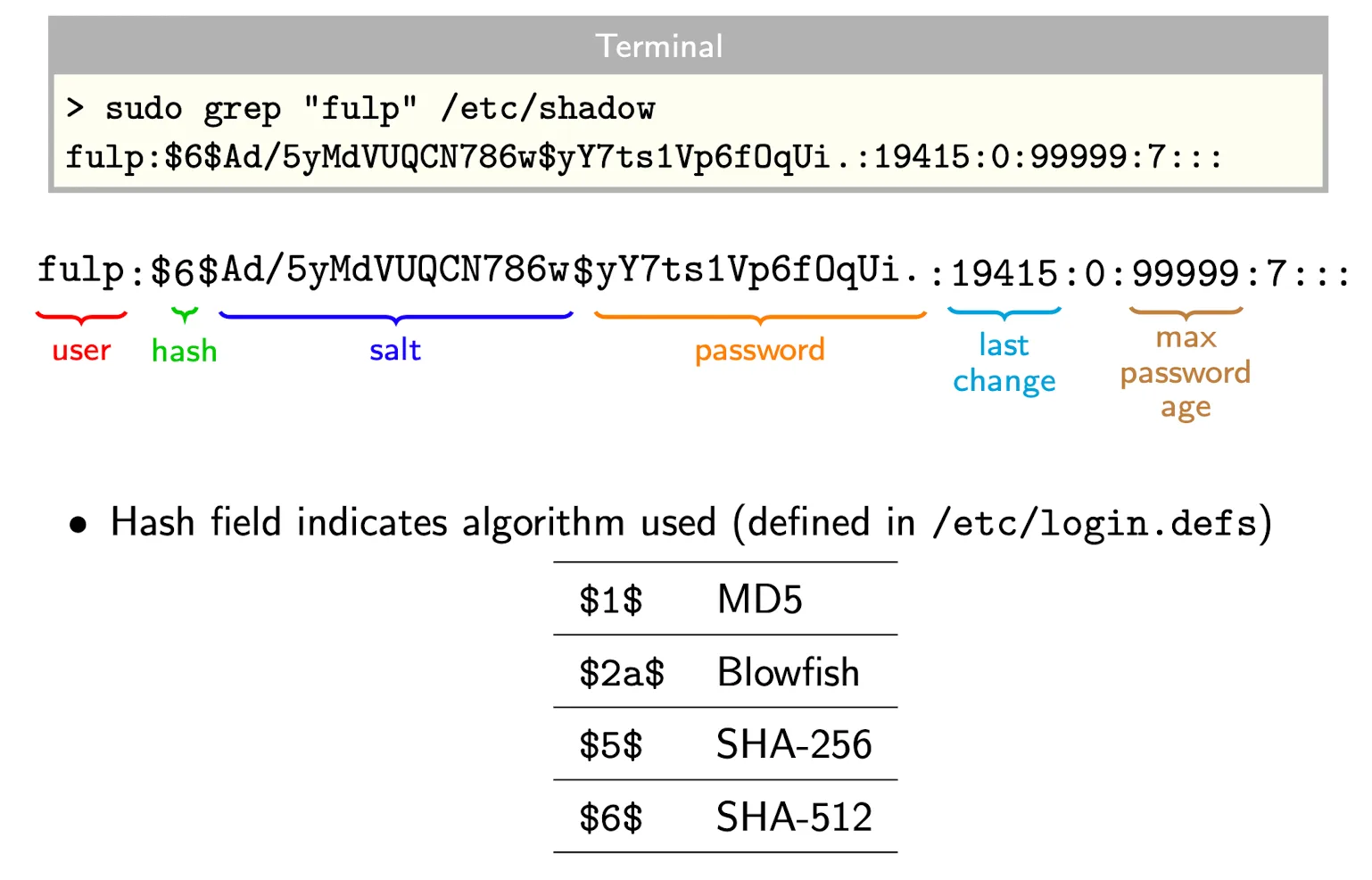
User Types
-
User Types
Rootis superuser that has complete control of the system- Root has
UID = 0and can do almost everything - Root can become any other user, change passwd file
- Root cannot change system read-only file
- Root has
Normal usercan log in to the system with restricted accessSystem usercannot log in, and their accounts are used for specific system purposes.
-
UNIX User UID and Group IDs
-
UNIX represents users by a user name and a user ID. UID is linked to user name in the passwd file
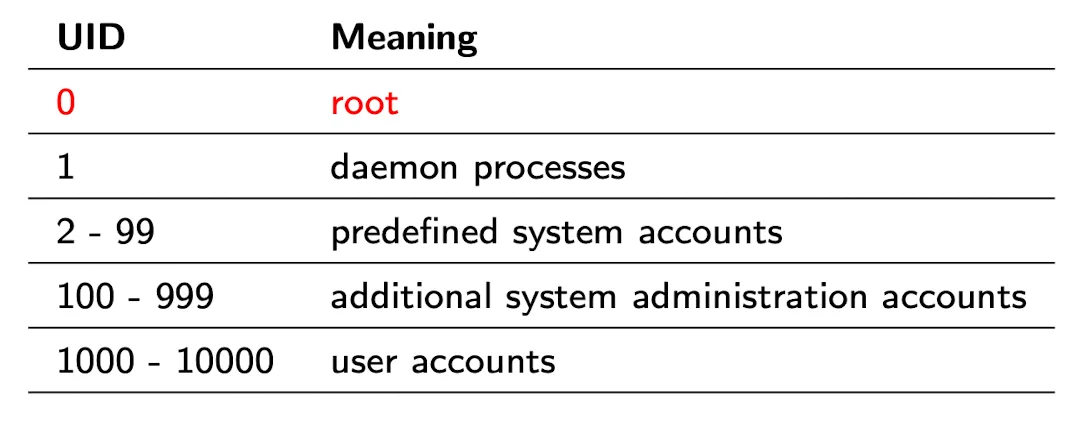
-
Group ID: Collecting users in groups for access control.
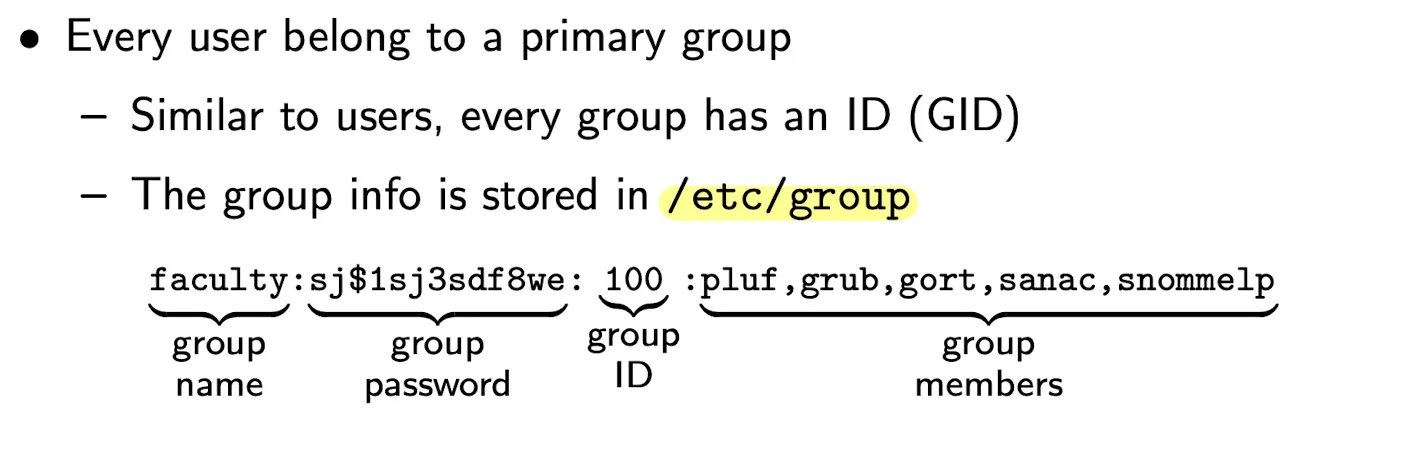
-
Discussion about Root Privilage Control
-
sudo, a more control method to share root.sudo = superuser do-
sudocan specifies the allowed privileged commands → prevent sudo - all or nothing (more granularity)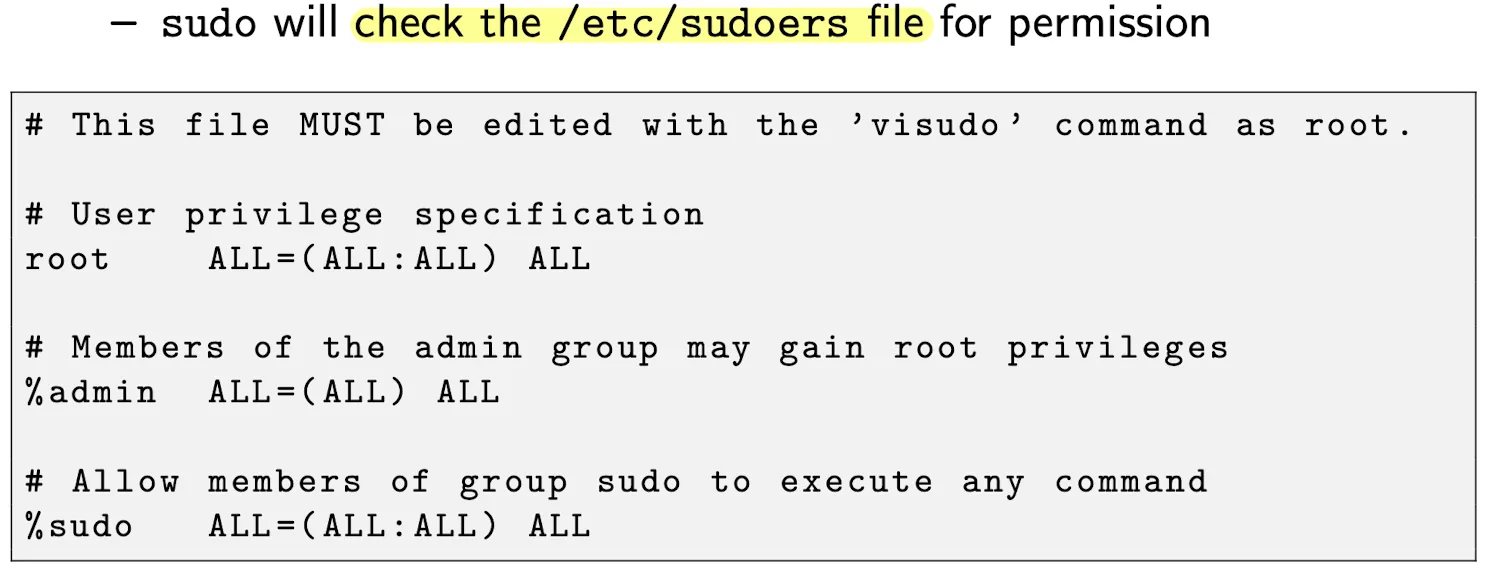
-
-
sudoers.dis a directory contains files specifying the permissions per group or user- The file path is
/etc/sudoers.d, and the idea is same assudoers, we just place entries in separate files - This change was done to prevent mistakes while updating
sudopermissions, The filesudoersstill exists even with this update


- The file path is
-
Controlled Invocation → a more careful way of giving privilage than sudo
-
UNIX may occasionally need superuser privilage to perform certain tasks
-
The solution is Set User ID (
SUID) and Set Group ID (SGID) programs-
Programs that are SUID give a user a different status during their execution, then return to normal once complete
-
The list of programs that has SUID bit turned on is: (You can also write your own
setuid()program)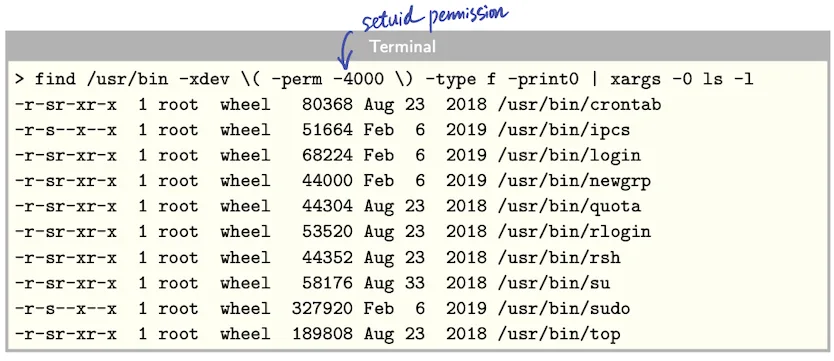
-
-
A program that sets the UID looks like:
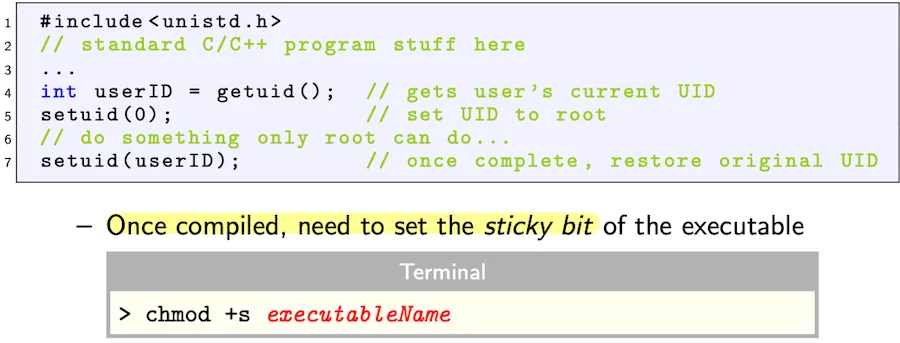
-
SUID program is very dangerous in terms of security, because people could hack you during the program is root, such as spawn a shell.
-
-
UNIX File Structure
-
UNIX arranges file in a tree structure.
- Base of tree is called root
/ - System consists of files and directories
- Every directory contians two files
.and.. - Every file has an owner and belongs to a group
- Base of tree is called root
-
For each file, the representation is:

- First character indicates if the file is a directory
d rwxmeans read, write, and execute
- First character indicates if the file is a directory
-
If the file is a SUID program, then the representation is:

- The reason why “
s” is used in place of “x” when thesetuidorsetgidbit is set on a file is to indicate that the execute bit is implicitly set along with the special bit.
- The reason why “
-
To change the permissions of a file, use the command
chmod- Add permission →
chmod who+perm fileName - Remove permission →
chmod who-perm fileName
- Add permission →
-
Check detailed information about file via
statcommand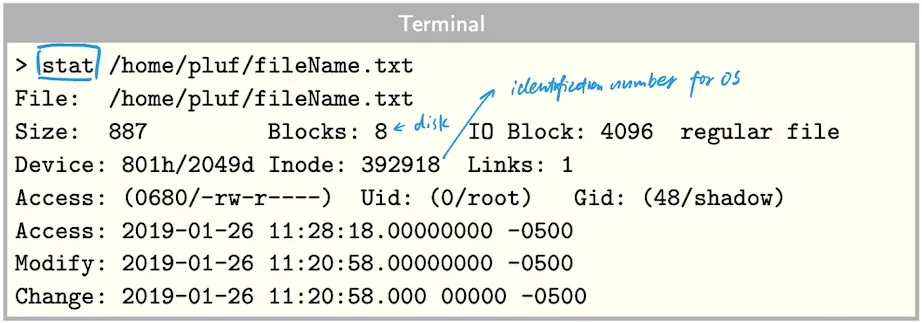
UNIX Command Shell
Bash Environment
- Every time a shell session started:
- A process takes place to gather and compile information that should be available to the shell process and its child processes
Environment Variable and Shell Variable
-
What is Environment Variable?
-
Environment variables can be created from local shell variables by
export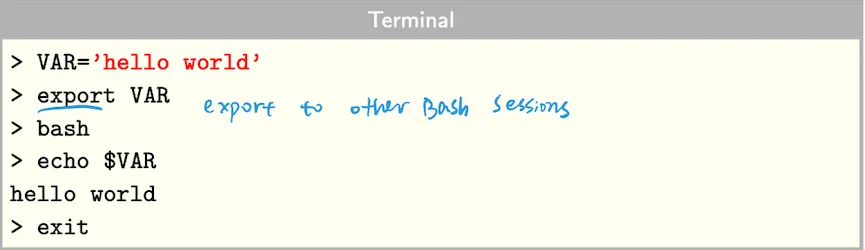
-
You can also create environment variable using
envcommand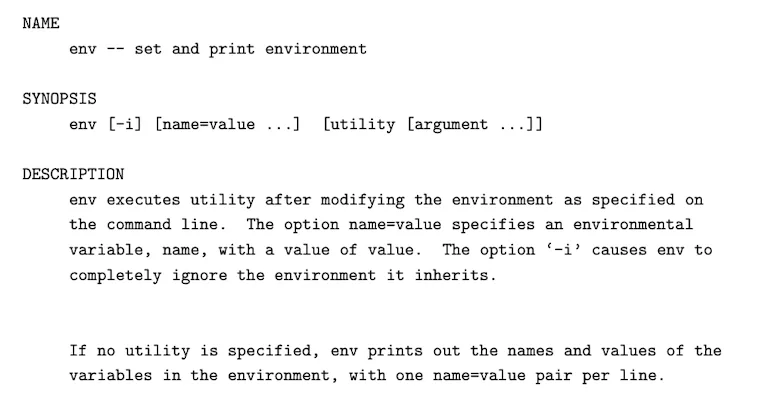
-
-
What is Bash Variable or Shell Variable (a more general term)?
What is the difference between environmental variable and bash variable
Environment variables are system-wide variables that are set and used by all programs running on a machine, while bash variables are specific to the shell or command being executed.
Environment variables can be set by the operating system or by users, and they provide information about the system and its configuration. Bash variables, on the other hand, are used to store information that is specific to a particular shell or command, such as the output of a command or a user-defined value. Bash variables are not accessible outside of the shell or command in which they are defined, while environment variables can be accessed by any program running on the machine.
What is the difference between Bash and Shell variable?
A shell variable and a bash variable are essentially the same thing, but they are often used in different contexts. “Shell variable” is a more general term that refers to a variable within any Unix-like shell (e.g., sh, bash, zsh, ksh, etc.), while “bash variable” specifically refers to a variable within the Bash (Bourne Again Shell) environment.
Both types of variables are used to store and manipulate data in the shell environment, and they can be set, accessed, and modified using shell scripting. However, the distinction is mainly based on the context in which they are used.
Here’s a summary:
- Shell variable: A variable used within any Unix-like shell environment. It is a more general term.
- Bash variable: A variable specifically used within the Bash shell environment.
Shell Shock
-
Bash environment variables can also export function definitions

- If a variable string starts with
() {, then this is a function
- If a variable string starts with
-
The case of shell shock
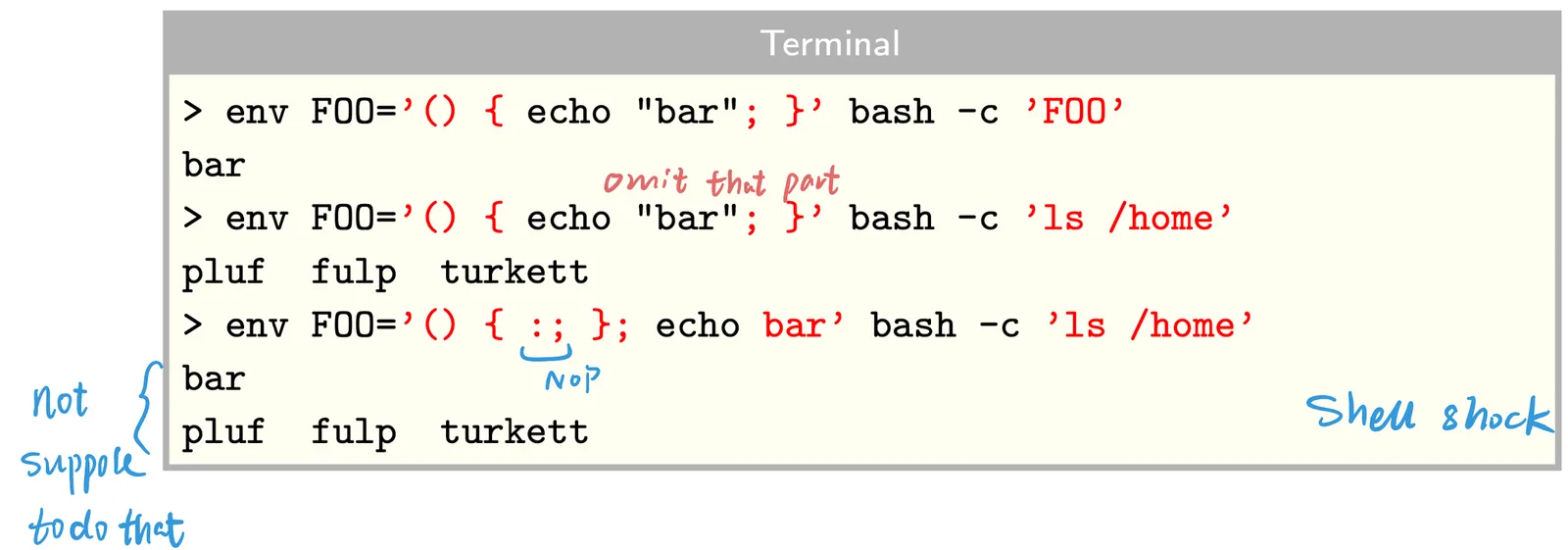
- For the third command above,
echo barshould not be executed at all - Thus, this bash issue allows arbitrary command execution
- For the third command above,
PATH
- Users interact with the OS through shell, such as zsh, bash, etc.
- As a matter of convience users can type run a program command without specifiying the complete path. For example, to run
ls, you don’t need to type/bin/ls.- The shell knows where to look using a PATH variable
- The PATH environment variable lists the directories to search and it’s defined in
.cshrcor.bashrcfile depends on the shell you use and located at home directory.-
The order matters! It determines the look up sequence.

-
Path Attack
Assume system admin has
.at the beginning of their PATH, so looking for local first
-
Create a file called
lswith the following contentcp /bin/sh ./Stuff/sume chmod 4555 ./Stuff/sume rm -f $0 exec /bin/ls $1-
cp /bin/sh ./Stuff/sume: Copies the/bin/shfile to./Stuff/sume. -
chmod 4555 ./Stuff/sume: Changes the permissions of the./Stuff/sumefile to allow it to run with elevated privileges.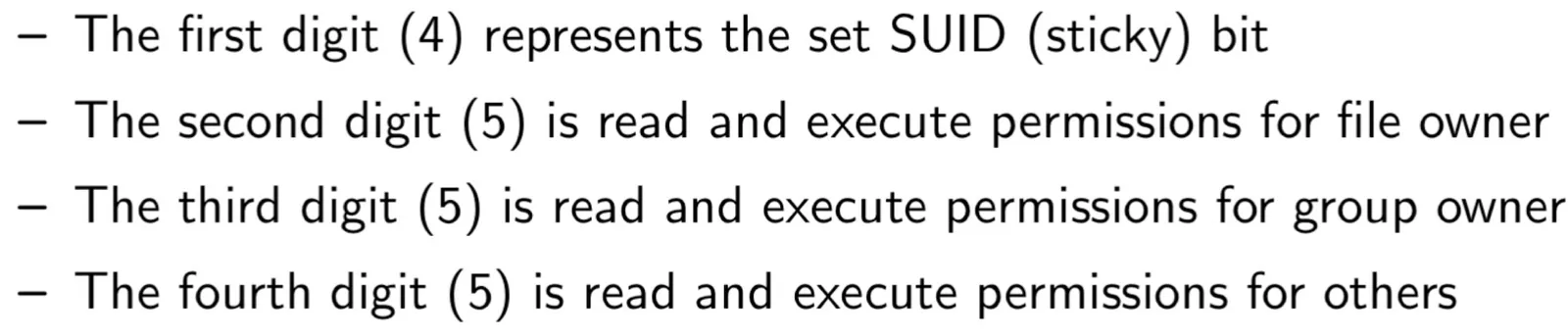
-
rm -f $0: Deletes the script file after it has been run. -
exec /bin/ls $1: Runs the/bin/lscommand with the specified argument, if any.
-
-
Create another unreadable file with whatever content
# create a file named -f, since admin may try rm -f chmod 700 .; touch ./-f -
You tell the admin you cannot erase one of your files (
-f) -
Admin becomes root moves to your directory and enters
ls, then your customized version oflsis executed -
You now have root for
sume, a root shell interpreter
LD_LIBRARY_PATH and LD_PRELOAD
LD_LIBRARY_PATHis used when searching for dynamic libraries, every unix program depends onlibc.so- If these libraries are exchanged with malware, attackers can place a fake libc.so to user’s machine and get executed everytime
# /tmp will be searched first for libc.so setenv LD_LIBRARY_PATH /tmp:$LD_LIBRARY_PATH - Most C runtime libraries have fixed this issue by ignoring the
LD_LIBRARY_PATHvar when the EUID (Process ID) is not equal to the UID (User ID)
- If these libraries are exchanged with malware, attackers can place a fake libc.so to user’s machine and get executed everytime
LD_PRELOADis the environment variable used to preload shared libraries-
This allows the user to replace standard C library functions, such as the C interfaces to system calls

-
IFS Environment Variable
-
IFS stands for Internal Field Separators, which identifies characters to be interpreted as whitespace
-
IFS malicious usage:
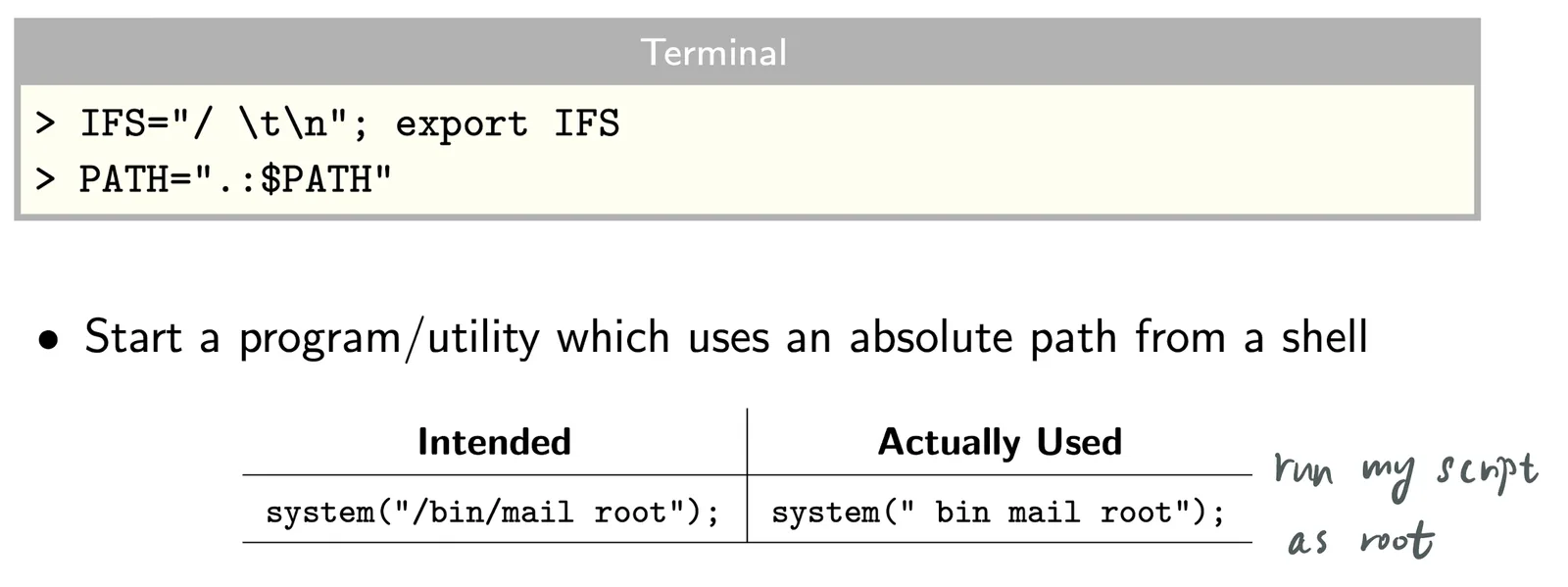
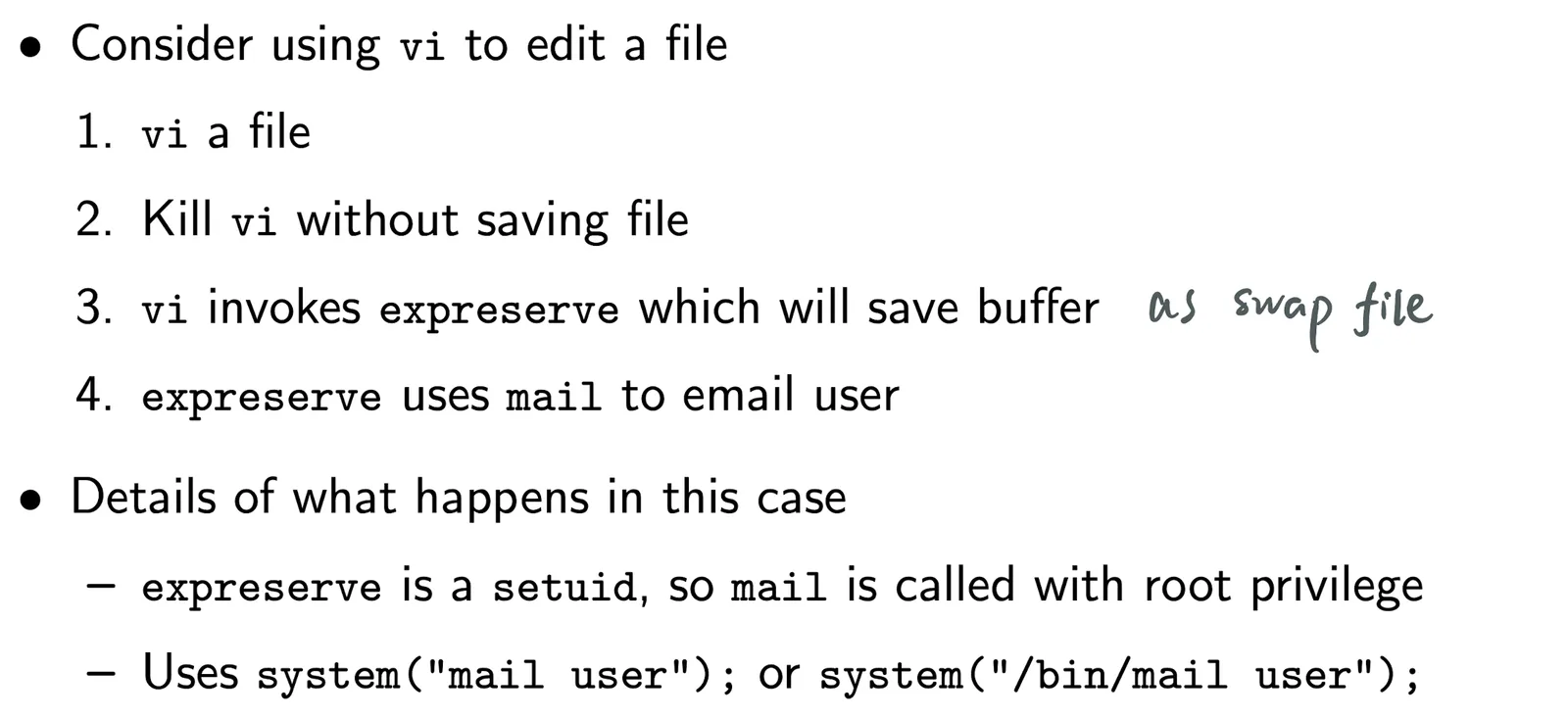
Vi + PATH _ IFS Attack
-
Context
-
Attack method

Avoid Environment Variables
It possible to avoid environment variables in the program by set external pointer variable environ to zero (NULL).

Session Configuration Files
-
Shell environment is configured using
.bashrcand.configfiles- File
.configexecuted per login - File
.bashrcexecuted for each new terminal as new shell starts
- File
-
Let take a close look at
.bashrcfile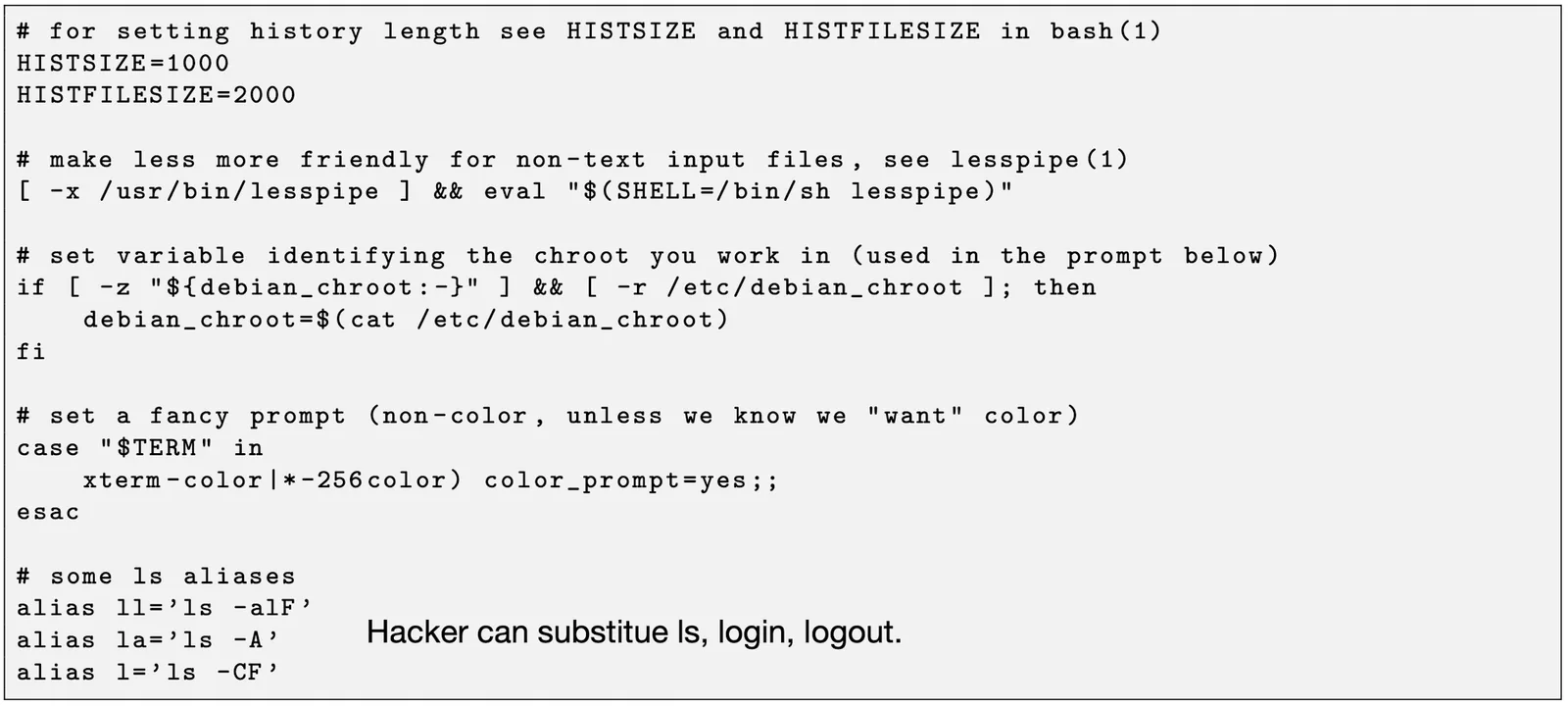
aliasis a place to hide commands
Root Processes
-
Three Processes
- Initial boot uses scripts in
/etc/rc*.ddepends on the system runlevel- In this boot script directory, for example,
/etc/rc5.d, is a directory that contains symbolic links to scripts in the/etc/init.ddirectory
- In this boot script directory, for example,
/etc/init.dis a directory that stores the init scripts responsible for managing system services. These scripts are typically executed by the system init processes.- Network processes
/etc/inetd.confsets the list of network services started at boot
- Initial boot uses scripts in
-
Commands
-
psortop: show what is running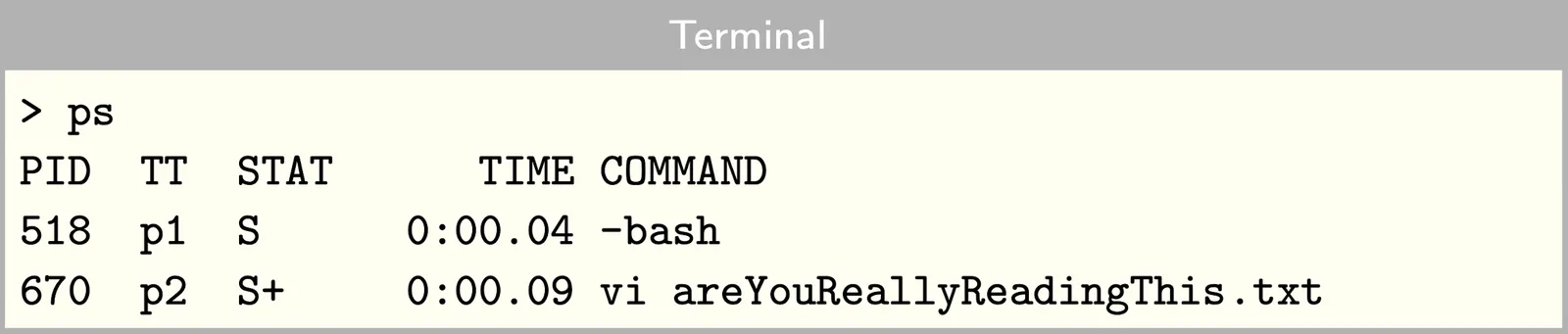
-
ps -efwill list the Parent Process ID (PPID)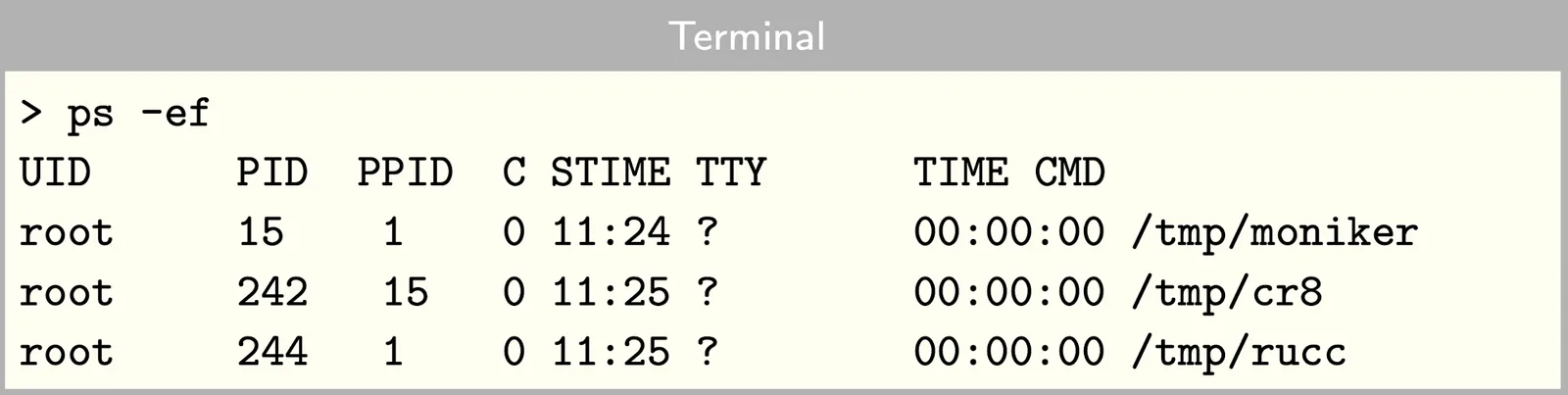
psshows the current process running and we can determine if we started them
-
-
initServices-
Started automatically during the boot or runlevel change, it locates in
/etc/init.dor/etc/rc.d/init/d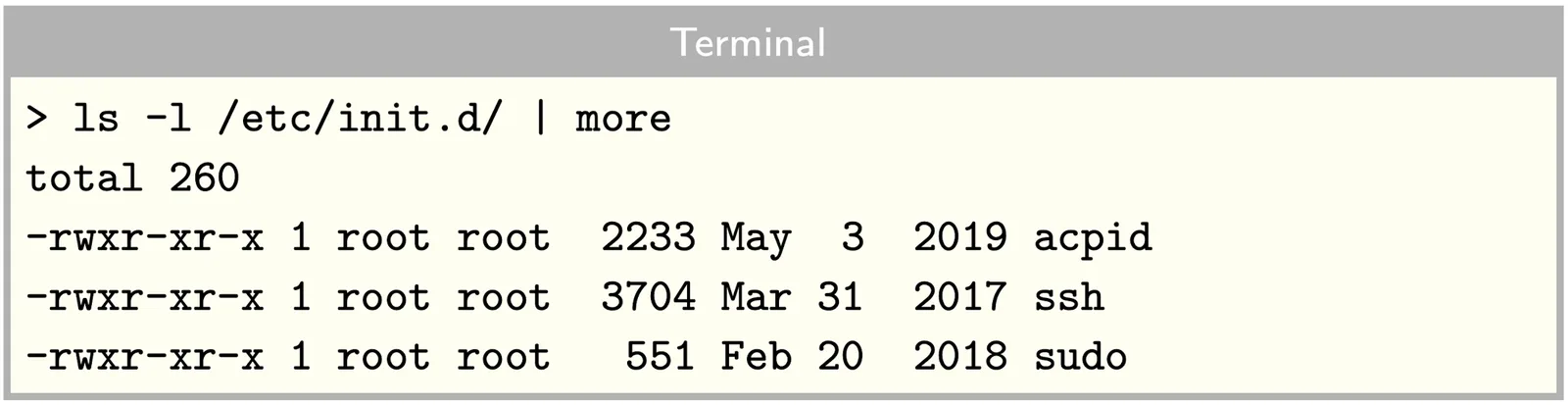
-
To start, restart, or stop a service, use following command

-
-
inetdServices-
This service is used for Internet based services and generally started via init scripts
inetd.conffile contentsseed@ip-10-4-149-82:/etc$ cat inetd.conf # /etc/inetd.conf: see inetd(8) for further informations. # # Internet superserver configuration database # # # Lines starting with "#:LABEL:" or "#<off>#" should not # be changed unless you know what you are doing! # # If you want to disable an entry so it isn't touched during # package updates just comment it out with a single '#' character. # # Packages should modify this file by using update-inetd(8) # # <service_name> <sock_type> <proto> <flags> <user> <server_path> <args> # #:INTERNAL: Internal services #discard stream tcp nowait root internal #discard dgram udp wait root internal #daytime stream tcp nowait root internal #time stream tcp nowait root internal #:STANDARD: These are standard services. telnet stream tcp nowait telnetd /usr/sbin/tcpd /usr/sbin/in.telnetd #:BSD: Shell, login, exec and talk are BSD protocols. #:MAIL: Mail, news and uucp services. #:INFO: Info services #:BOOT: TFTP service is provided primarily for booting. Most sites # run this only on machines acting as "boot servers." #:RPC: RPC based services #:HAM-RADIO: amateur-radio services #:OTHER: Other services #<off># sane-port stream tcp nowait saned:saned /usr/sbin/saned saned -
netstatcommand: stands for network statistics. It displays information about active network connections, including the local and remote addresses, the protocol used (TCP or UDP), the state of the connection (e.g. established, listening, etc.), and the process ID (PID) of the application or service that is associated with the connection.# shows all active TCP connections netstat -atn -
Common options for the
netstatcommand include:a: displays all active connections, including listening portsn: displays network addresses as numeric values rather than resolving them to host and domain namesp: displays the process ID and name of the program that is associated with each connectionr: displays the system’s routing table
-
Cron Job
- How to control cron jobs?
-
Go to directory
/etc, it containscronsub-directories
-
Each sub-dir has a repeat time associated with it
-
You can place a script in the sub-dir you want
-
An Example of daily script

-
More script time flexibility is provided in the
/etc/crontabfile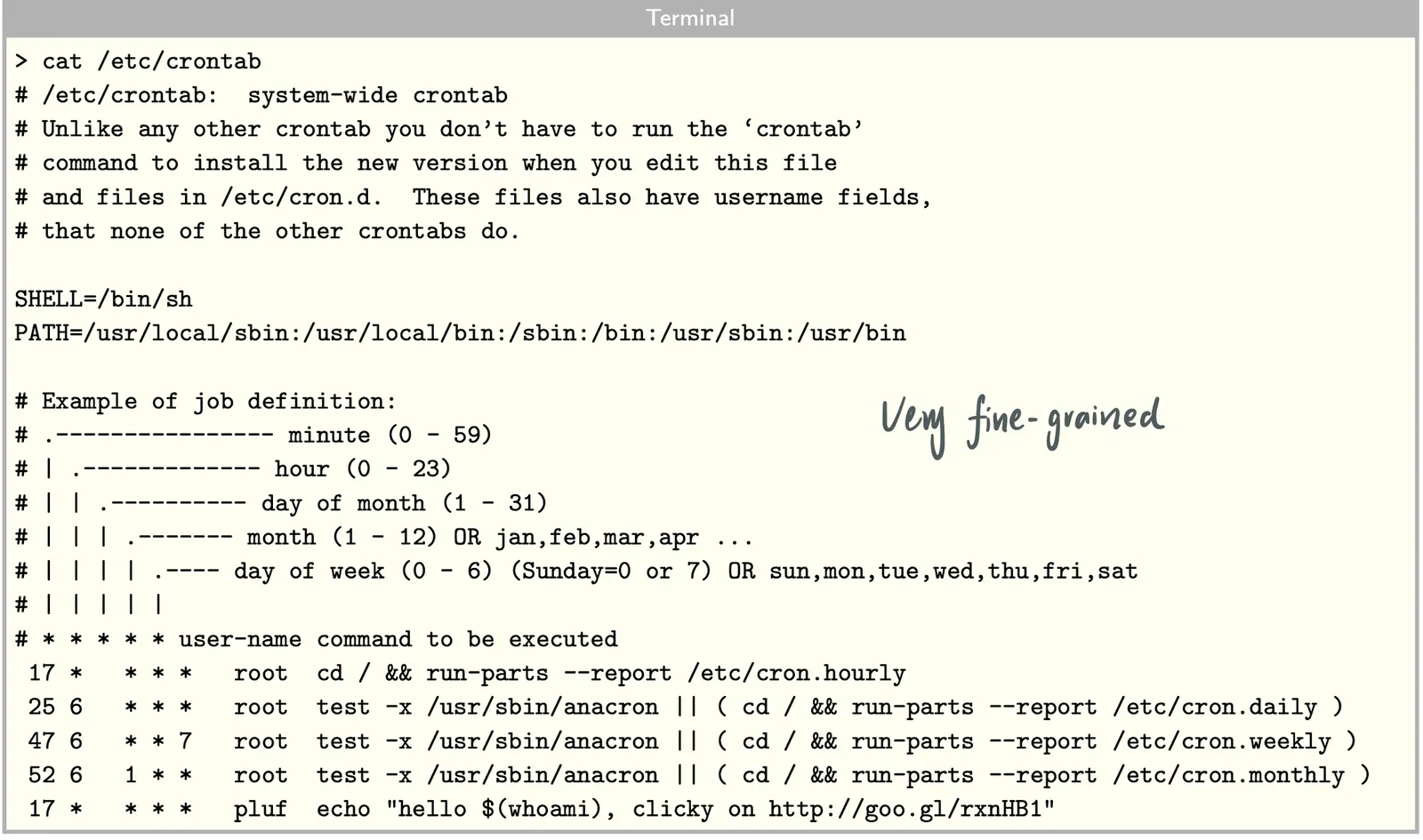
-
-
What is Running?
# List all active system services
systemctl list-units --type=service --state=running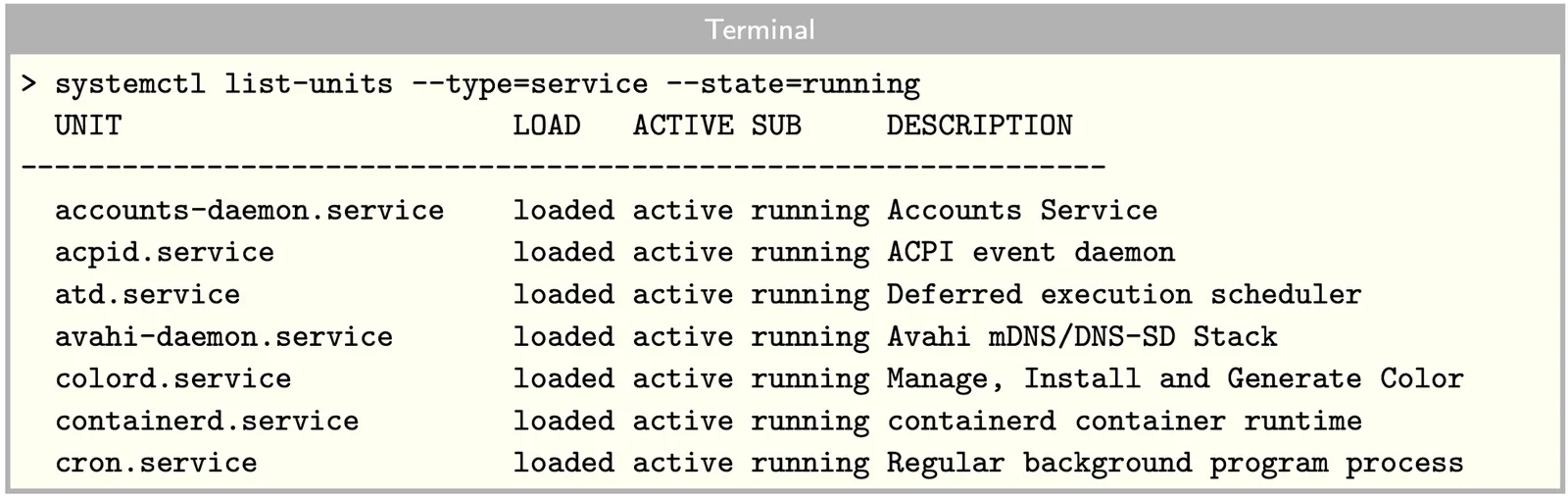
# Display the running processes in tree format
pstree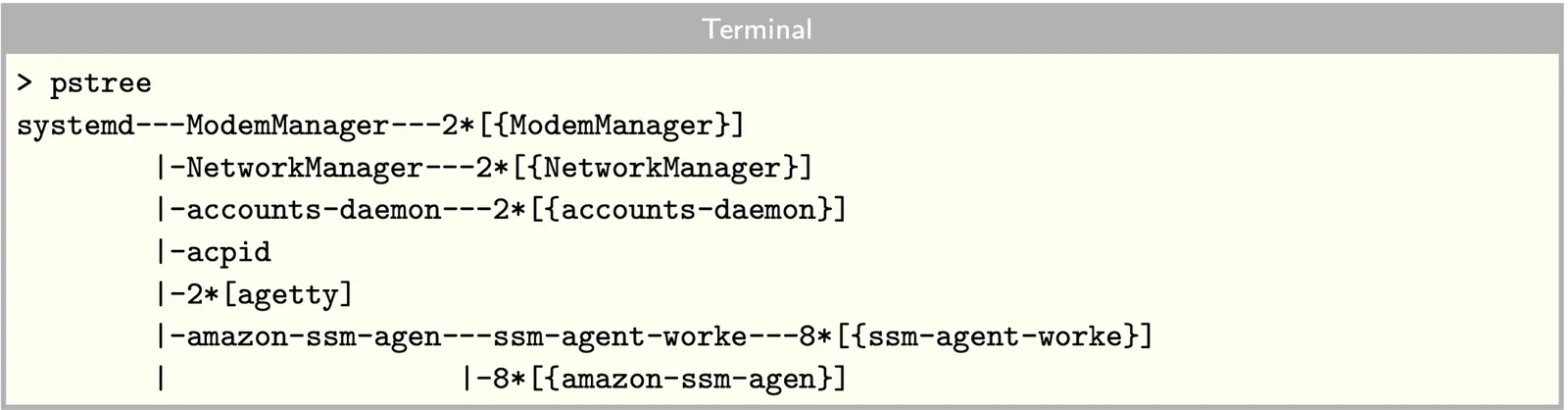
# Inspect based on network connectivity
netstat -a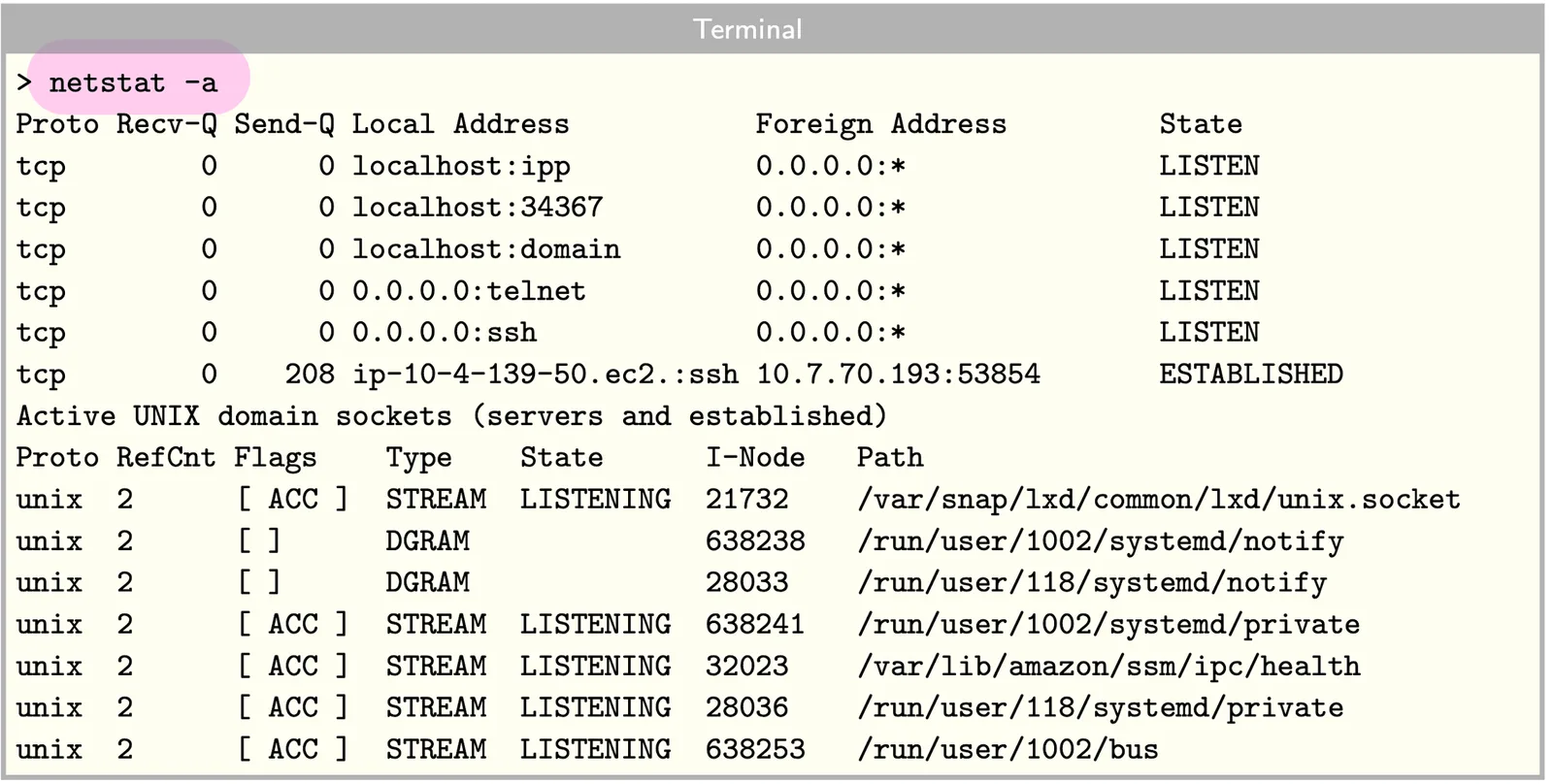
- Unix domain sockets are interprocess communication
Audit Trails
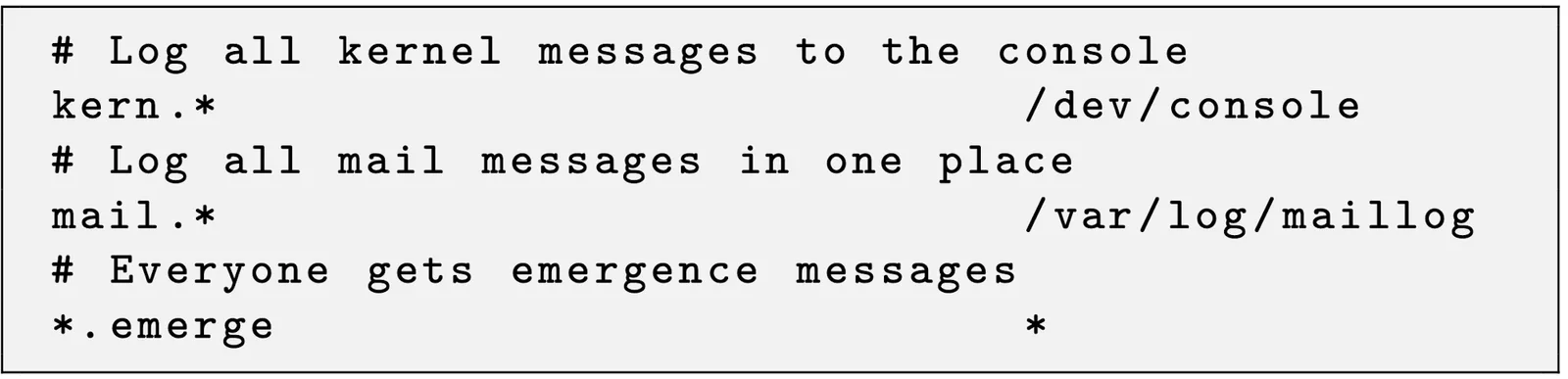
syslog()-
Logging is done by
syslogddaemon, and it has UDP support -
The file
/etc/rsyslog.confindicates log locationsselector + action
-
Intrusion Detection System
-
To check all authentication attempts
sudo grep "sshd" /var/log/auth.log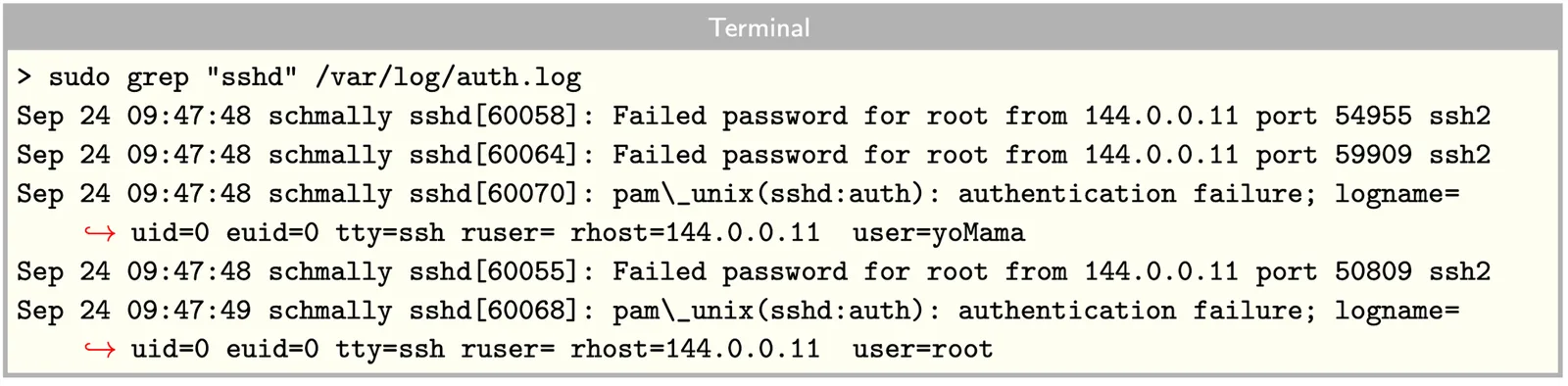
Make Unix/Linux More Secure
-
Set a password to disallow booting from USB, DVD, etc…
This is done by setting a BIOS or UEFI password, which requires a password to be entered before the system can boot from removable media such as USB drives or DVDs. This helps prevent unauthorized access to the system or the installation of malware from external sources.
-
Disable special and default accounts
Unix/Linux systems come with several default accounts, including
lp,sync,shutdown,operator, and others. These accounts are typically used for system processes and are not intended for general user access. It is recommended to disable these accounts or change their passwords to prevent unauthorized access.# Locks the lp account, preventing anyone from logging in that account. sudo usermod -L lp -
Set a timeout (TMOUT=) in the profile file (users and root)
-
Disable console-equivalent user access to reboot, shutdown
-
Disable unnecessary network services (with caution)
- Edit the
/etc/inetd.conffile - make certain root is the owner of
/etc.inetd.conf - Change permission of
/etc/inetd.confto 600 (read and write permissions for the owner of the file and no permissions for the group and others.)
- Edit the
-
Use
TCP_WRAPPERSand/or firewall to control access -
Do not display the system issue information at log in
-
Review the
/etc/host.conffile- This file resolves IP names to addresses
- You can make it ask DNS first or have the file resolve
-
Immunize
/etc/servicesfile, the file that maps ports to applications- Prevent unauthorized deletion or addition of services
- Use the command
chattr +i /etc/services
-
Make signatures of any setuid programs, such as MD5 signature
-
Prevent users from
su, should dosudoinstead -
Have the shell erase the command history of a user at log out, can be done with
/bash_logoutfile -
Disable the Control-Alt-Delete keyboard shutdown command
-
Fix permissions under
/etc/rc.d/init.ddirecotry for script files- Use the command
chmod -R 700 /etc/rc.d/init.d/*
- Use the command
-
Turn off the machine and don’t turn it on ever